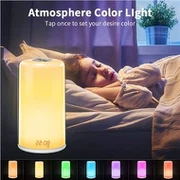
Bluetooth speaker light connection and control
Aug 31, 2022
Bluetooth speaker light connection and control
1) Adjust the color temperature and brightness of the main light: Click the icon, the light will turn white, slide the color temperature slider to adjust the color temperature of the light, and slide the brightness slider to adjust the brightness of the light.
2) Adjust the color and brightness of the main light: Click the icon to switch to the color wheel interface, click the color on the color wheel, and the light will change to the selected color. Slide the brightness slider to adjust the brightness of the selected color.
3) Adjust the color and brightness of the main light according to the selected picture: Click the button, import the photo from the mobile phone album or take a photo directly, click anywhere on the photo, the light will become the color selected on the photo, or click the icon in the upper right corner Change the photo; slide the brightness slider to adjust the brightness of the selected color.